Pages

Thursday, September 30, 2010

The system file is not suitable for running MS-DOS and Microsoft Windows applications

Method 1

  1. Insert the CD into the CD drive or DVD drive.
  2. Click Start, and then click Run.
  3. In the Open box, type cmd, and then click OK.
  4. At the command prompt, type the following commands, pressing ENTER after each command:

    expand CD-ROM Drive Letter:\i386\config.nt_ c:\windows\system32\config.nt
    expand CD-ROM Drive Letter:\i386\autoexec.nt_ c:\windows\system32\autoexec.nt
    expand CD-ROM Drive Letter:\i386\command.co_ c:\windows\system32\command.com
    exit
  5. Start or install the program. If the issue is resolved, do not complete the remaining steps. If the issue is not resolved, go to the next step.
  6. Note: The Command.com file is not edited or created in the following process. Because of this, you may have to expand it from your Windows XP CD-ROM.

    Start Notepad.
  7. In Notepad, type the following entries:
       dos=high, umb
    device=%SYSTEMROOT%\system32\himem.sys
    files=40
  8. On the File menu, click Save As.
  9. In the File Name box, type Config.nt, and then click Save. Close the Config.nt file.
  10. On the File menu, click New.
  11. In the new blank document, type the following entries:
    @echo off
    lh %SYSTEMROOT%\system32\mscdexnt.exe
    lh %SYSTEMROOT%\system32\redir
    lh %SYSTEMROOT%\system32\dosx
    SET BLASTER=A220 I5 D1 P330 T3
  12. On the File menu, click Save As.
  13. In the File Name box, type Autoexec.nt, and then click Save. Close the Autoexec.nt file.
  14. Start Windows Explorer. Locate the Config.nt file, right-click the Config.nt file, and then click Copy.
  15. Right-click the %SYSTEMROOT%\System32 folder, and then click Paste.
  16. Locate the Autoexec.nt file, right-click the Autoexec.nt file, and then click Copy.
  17. Right-click the %SYSTEMROOT%\System32 folder, and then click Paste.
  18. Locate the Command.com file, right-click the expanded Command.com file, and then click Copy.
  19. Right-click the %SYSTEMROOT%\System32 folder, and then click Paste. Restart your computer.
If the issue continues to occur, copy the Autoexec.nt and Config.nt files from the Repair folder in Windows to the System folder. To do so, follow these steps:
  1. Click Start, click Run, type c:\windows\repair, and then click OK.
  2. Right-click Autoexec.nt, and then click Copy.
  3. Click Start, click Run, type c:\windows\system32, and then click OK.
  4. Right-click anywhere in that folder, and then click Paste.
  5. Right-click the Autoexec.nt file that you just copied, and then click Properties.
  6. Click to select Read-Only, and then click OK.
  7. Repeat steps 1 through 6 to copy the Config.nt file.
Note You must enable Read-Only permissions or the files will be removed after you restart Windows.

Method 2

  1. Click Start, click Run, type C:\windows\repair, and then click OK.
  2. Right-click the Autoexec.nt file, and then click Copy.
  3. Click Start, click Run, type %windir%\system32, and then click OK.
  4. In the System32 folder, press Ctrl + V to paste the Autoexec.nt file in this folder.
Sumber : http://support.microsoft.com

Wednesday, August 18, 2010

Uninstall a Service in Windows

Uninstall a Service

If you want to delete/uninstall/remove a Windows service, perhaps left from an incomplete installer, you can use the sc command from an Administrator control prompt: sc delete [servicename]

Monday, August 16, 2010

71 Situs Indonesia Dikerjai "Hacker"

Senin, 16 Agustus 2010 | 01:28 WIB
Tampilan laman pada 71 situs yang dikerjai para peretas.

KOMPAS.com — Menjelang peringatan kemerdekaan ke-65 Republik Indonesia, hacker atau peretas dari Indonesia justru bikin ulah di puluhan situs yang mayoritas milik lembaga resmi di Indonesia.

Mereka meninggalkan pesan begini, "DIRGAHAYU INDONESIA TANAH AIR PUSAKA JAYALAH BANGSAKU, JAYALAH NEGERIKU..MERDEKA!!"

Aksi itu dimotori peretas yang menyebut diri Aria Killnine a.k.a arianom, pendiri komunitas KiLL-9 CrEw dengan situsnya di Www.KiLL-9.Tk.

Daftar situs yang diretas terlihat di bawah nanti. Namun yang jadi pertanyaan, mengapa pula justru mereka menyerang situs milik anak bangsa sendiri?

Kompasianer
Rakhjib Martapianur memberi tahu, "Mereka tidak melakukan perusakan terhadap site-site tersebut. Mereka hanya menitipkan file, sekaligus mengingatkan para admin site tersebut bahwa site yang mereka kelola rentan terhadap serangan oleh hacker-hacker luar Indonesia."

Rakhjib Martapianur mengakui, informasi itu dia ketahui dari temannya yang bergelut di dunia meretas. Dan, inilah daftar situs yang dititipkan pesan-pesan dari peretas itu:

1. http://semestaberjaya.com/indonesiaku.php
2. http://fs.uns.ac.id/indonesia.php
3. http://unj.ac.id/indonesia.php
4. http://www.unand.ac.id/foto/indonesia.htm
5. http://el82itb.org/indonesia.htm
6. http://unhalu.ac.id/staff/indonesia.htm
7. http://www.adhiguna.ac.id/indonesia.htm
8. http://www.stikes-insan-seagung.ac.id/indonesia.htm
9. http://www.himsya.ac.id/indonesia.htm
10. http://www.poltekpos.ac.id/indonesia.htm
11. http://informatika.uin-malang.ac.id/COPYRIGHT.php
12. http://www.mar-eng.its.ac.id/ina/akademik/admin/foto_berita/indonesia.htm
13. http://kaltimprov.go.id/indonesia.php
14. http://pengadilan.net/indonesia.php
15. http://bkp.deptan.go.id/indonesia.htm
16. http://kemenegpora.go.id/merdeka.html
17. http://sifa.kemenegpora.go.id/merdeka.html
18. http://www.lsf.go.id/merdeka.html
19. http://pekalongankota.go.id/merdeka.html
20. http://bpphp1.dephut.go.id/merdeka.html
21. http://bpphp2.dephut.go.id/merdeka.html
22. http://bpphp3.dephut.go.id/merdeka.html
23. http://bpphp4.dephut.go.id/merdeka.html
24. http://bpphp5.dephut.go.id/merdeka.html
25. http://bpphp6.dephut.go.id/merdeka.html
26. http://bpphp8.dephut.go.id/merdeka.html
27. http://bpphp9.dephut.go.id/merdeka.html
28. http://bpphp10.dephut.go.id/merdeka.html
29. http://manmajenang.sch.id/files/indonesia.php
30. http://spma-samarinda.sch.id/indonesia.htm
31. http://smkn1kalasan.sch.id/merdeka.html
32. http://smkn1madiun.sch.id/merdeka.html
33. http://robbirodliyya.sch.id/merdeka.html
34. http://smkypesampang.sch.id/merdeka.html
35. http://www.smpn3kpj.sch.id/merdeka.html
36. http://www.majesa.sch.id/merdeka.html
37. http://smkypkpwk.sch.id/merdeka.html
38. http://smpn5cirebon.sch.id/merdeka.html
39. http://smpn2balen.sch.id/merdeka.html
40. http://smpn1oku.sch.id/merdeka.html
41. http://smkn6palembang.sch.id/merdeka.html
42. http://smpn4gm.sch.id/merdeka.html
43. http://smpn5lht.sch.id/merdeka.html
44. http://manhokut.sch.id/merdeka.html
45. http://mtsdarussalampkp.sch.id/merdeka.html
46. http://smkn1barru.sch.id/merdeka.html
47. http://sman3bantul.sch.id/merdeka.html
48. http://sman1cepu.sch.id/merdeka.html
49. http://smpn1piyungan-btl.sch.id/merdeka.html
50. http://www.smansa-mjl.sch.id/merdeka.html
51. http://smp1pra-bws.sch.id/merdeka.html
52. http://smpn13bdg.sch.id/merdeka.html
53. http://smpn1panumbangan.sch.id/merdeka.html
54. http://smpmuh-ckn.sch.id/merdeka.html
55. http://smkkpbe-bdg.sch.id/merdeka.html
56. http://sditalamysubang.sch.id/merdeka.html
57. http://sdnbjs2bdg.sch.id/merdeka.html
58. http://www.smaplusbanyuasin.sch.id/merdeka.html
59. http://www.smkn1samarinda.com/merdeka.html
60. http://akademik.sma-alirsyad-clp.sch.id/merdeka.html
61. http://sma-alirsyad-clp.sch.id/merdeka.html
62. http://www.majesa.sch.id/merdeka.html
63. http://www.bellarminus-bks.sch.id/merdeka.html
64. http://sman2-wng.sch.id/merdeka.html
65. http://www.sma1pekalongan.sch.id/merdeka.html
66. http://kimomibutik.com/admin/foto_berita/indonesia.htm
67. http://www.smart-v-indonesia.com/indonesia.php
68. http://kabar-kini.com/indonesia.htm
69. http://semestaberjaya.com/indonesia.php
70. http://tikjo.my-php.net/indonesia.php
71. http://www.pusatk3hiperkes.com/indonesia.htm

Sumber : www.kompas.com

Friday, June 18, 2010

Quiz Java Netbeans (NURI - 11.7E.01 Kel.B)

Ketentuan Soal :
---------------------
1. Jenis Makanan :
- Ayam Goreng = Rp. 20.000,-
- Ayam Bakar = Rp. 15.000,-
- Bebek Goreng = Rp. 30.000,-
- Bebek Bakar = Rp. 25.000,-

2. Kemasan :
- Langsung = Diskon 50%
- Pesan = Diskon 10%

Source Code :
----------------

package mykalkulator;
import javax.swing.JOptionPane;
/**
*
* @author aie_sendiri
*/
public class QUIZ_FFOOD extends javax.swing.JFrame {

/** Creates new form QUIZ_FFOOD */
public QUIZ_FFOOD() {
initComponents();
}

1. Pembuatan Method :
@SuppressWarnings("unchecked")
Generated Code
void jenis(){
if(rbtnayam.isSelected() && chidangan.getSelectedItem().toString().equalsIgnoreCase("GORENG")){
txthrg.setText("20000");
txtbeli.requestFocus();
}
else if(rbtnayam.isSelected() && chidangan.getSelectedItem().toString().equalsIgnoreCase("BAKAR")){
txthrg.setText("15000");
txtbeli.requestFocus();
}
else if(rbtnbebek.isSelected() && chidangan.getSelectedItem().toString().equalsIgnoreCase("GORENG")){
txthrg.setText("30000");
txtbeli.requestFocus();
}
else if(rbtnbebek.isSelected() && chidangan.getSelectedItem().toString().equalsIgnoreCase("BAKAR")){
txthrg.setText("25000");
txtbeli.requestFocus();
}
else{
txthrg.setText("0");
}
}

2. Radio Button Ayam :
private void rbtnayamActionPerformed(java.awt.event.ActionEvent evt) {
// TODO add your handling code here:
jenis();
}

3. Radio Button Bebek :
private void rbtnbebekActionPerformed(java.awt.event.ActionEvent evt) {
// TODO add your handling code here:
jenis();
}

4. Combo Box Hidangan :
private void chidanganActionPerformed(java.awt.event.ActionEvent evt) {
// TODO add your handling code here:
jenis();
}

5. Button Hitung :
private void btnhitungActionPerformed(java.awt.event.ActionEvent evt) {
// TODO add your handling code here:
int hrg = Integer.parseInt(txthrg.getText());
int beli = Integer.parseInt(txtbeli.getText());
int total = hrg * beli;
txttotal.setText(String.valueOf(total));
if(ckemasan.getSelectedItem().toString().equalsIgnoreCase("LANGSUNG")){
int pot = total * 50/100;
int totber = total - pot;
txtpot.setText(String.valueOf(pot));
txttotber.setText(String.valueOf(totber));
txtbayar.requestFocus();
}
else if(ckemasan.getSelectedItem().toString().equalsIgnoreCase("PESAN")){
int pot = total * 10/100;
int totber = total - pot;
txtpot.setText(String.valueOf(pot));
txttotber.setText(String.valueOf(totber));
txtbayar.requestFocus();
}
else{
txtpot.setText("0");
txttotber.setText("0");
}
}

6. Text Field Bayar :
private void txtbayarActionPerformed(java.awt.event.ActionEvent evt) {
// TODO add your handling code here:
int bayar = Integer.parseInt(txtbayar.getText());
int totber = Integer.parseInt(txttotber.getText());
if(bayar>=totber){
int kembali = bayar - totber;
txtkembali.setText(String.valueOf(kembali));
}
else {
int kurang = JOptionPane.showConfirmDialog(null,"Uang Bayar Kurang !!","PERHATIAN",JOptionPane.OK_CANCEL_OPTION);
if(kurang == JOptionPane.OK_OPTION){
txtbayar.setText("");
txtkembali.setText("");
}
else{
txtbayar.setText("");
txtkembali.setText("");
}
}
}

7. Button Lagi :
private void btnlagiActionPerformed(java.awt.event.ActionEvent evt) {
// TODO add your handling code here:
btngrpmkn.clearSelection();
chidangan.setSelectedIndex(0);
txthrg.setText("");
txtbeli.setText("");
ckemasan.setSelectedIndex(0);
txttotal.setText("");
txtpot.setText("");
txttotber.setText("");
txtbayar.setText("");
txtkembali.setText("");
rbtnayam.requestFocus();

}

8. Button Keluar :
private void btnkeluarActionPerformed(java.awt.event.ActionEvent evt) {
// TODO add your handling code here:
int keluar = JOptionPane.showConfirmDialog(null,"Ingin Keluar ??","Pertanyaan",JOptionPane.YES_NO_OPTION);
if(keluar==JOptionPane.YES_OPTION){
System.exit(0);
}
else{
return;
}
}

Semoga Berguna !!

Saturday, June 12, 2010

Latihan Java - NetBeans : Restoran Cepat Saji "NURI"

* Latihan kali ini diincludekan cara pemakaian method.

Ketentuan soal :

1. Hidangan
--------------------------------
AYAM BAKAR = Rp. 20.000,-
AYAM GULAI = Rp. 15.000,-
BEBEK BAKAR = Rp. 30.000,-
BEBEK GULAI = Rp. 25.000,-
--------------------------------
2. Kemasan
--------------------------------
PESAN = Diskon 10%
LANGSUNG = Diskon 50%
--------------------------------

Source Code :
---------------------------------------------------------------------------------------
package mykalkulator;
import javax.swing.JOptionPane;
/**
*
* @author aie_sendiri
*/
public class FRESTO extends javax.swing.JFrame {
/** Creates new form FRESTO */
public FRESTO() {
initComponents();
}

/** This method is called from within the constructor to
* initialize the form.
* WARNING: Do NOT modify this code. The content of this method is
* always regenerated by the Form Editor.
*/
@SuppressWarnings("unchecked")

// Cara Pembuatan Method :
void hitung(){

if(chidangan.getSelectedItem().toString().equalsIgnoreCase("BAKAR") && rbtnayam.isSelected()){
tharga.setText("20000");
ckemasan.requestFocus();
}
else if(chidangan.getSelectedItem().toString().equalsIgnoreCase("BAKAR") && rbtnbebek.isSelected()){
tharga.setText("30000");
ckemasan.requestFocus();
}
else if(chidangan.getSelectedItem().toString().equalsIgnoreCase("GULAI") && rbtnayam.isSelected()){
tharga.setText("15000");
ckemasan.requestFocus();
}
else if(chidangan.getSelectedItem().toString().equalsIgnoreCase("GULAI") && rbtnbebek.isSelected()){
tharga.setText("25000");
ckemasan.requestFocus();
}
else{
tharga.setText("0");
rbtnayam.requestFocus();
}
}
---------------------------------------------------------------------------------------

1. Radio Button Ayam :
private void rbtnayamActionPerformed(java.awt.event.ActionEvent evt) {
// TODO add your handling code here:
// Pemanggilan method :
hitung();
}

2. Radio Button Bebek :
private void rbtnbebekActionPerformed(java.awt.event.ActionEvent evt) {
// TODO add your handling code here:
// Pemanggilan method :
hitung();
}

3. Combo Box Hidangan :
private void chidanganActionPerformed(java.awt.event.ActionEvent evt) {
// TODO add your handling code here:
// Pemanggilan method :
hitung();
}

4. Combo Box Kemasan :
private void ckemasanActionPerformed(java.awt.event.ActionEvent evt) {
// TODO add your handling code here:
if(ckemasan.getSelectedItem().toString().equalsIgnoreCase("PESAN")){
int total = Integer.parseInt(tharga.getText());
ttotal.setText(String.valueOf(total));
int pot = total * 10/100;
tpot.setText(String.valueOf(pot));
int totber = total - pot;
ttotber.setText(String.valueOf(totber));
tbayar.requestFocus();
}
else if(ckemasan.getSelectedItem().toString().equalsIgnoreCase("LANGSUNG")){
int total = Integer.parseInt(tharga.getText());
ttotal.setText(String.valueOf(total));
int pot = total * 50/100;
tpot.setText(String.valueOf(pot));
int totber = total - pot;
ttotber.setText(String.valueOf(totber));
tbayar.requestFocus();
}
else{
ttotal.setText("0");
tpot.setText("0");
ttotber.setText("0");
ckemasan.requestFocus();
}
}

5. Text Field Bayar :
private void tbayarActionPerformed(java.awt.event.ActionEvent evt) {
// TODO add your handling code here:
int totber = Integer.parseInt(ttotber.getText());
int bayar = Integer.parseInt(tbayar.getText());
if(bayar>=totber){
int kembali = bayar - totber;
tkembali.setText(String.valueOf(kembali));
}
else{
int validasi = JOptionPane.showConfirmDialog(null,"MAAF, Uang Bayar Kurang !!","Pemberitahuan",JOptionPane.OK_CANCEL_OPTION);
if( validasi==JOptionPane.OK_OPTION){
tbayar.setText("");
tkembali.setText("0");
tbayar.requestFocus();
}
else{
tbayar.setText("");
tkembali.setText("0");
tbayar.requestFocus();
}
}
}

6. Button Bersih :
private void btnbersihActionPerformed(java.awt.event.ActionEvent evt) {
// TODO add your handling code here:
btngrpmkn.clearSelection();
chidangan.setSelectedIndex(0);
tharga.setText("0");
ckemasan.setSelectedIndex(0);
ttotal.setText("0");
tpot.setText("0");
ttotber.setText("0");
tbayar.setText("0");
tkembali.setText("0");
rbtnayam.requestFocus();
}

7. Button Keluar :
private void btnkeluarActionPerformed(java.awt.event.ActionEvent evt) {
// TODO add your handling code here:
int keluar=JOptionPane.showConfirmDialog(null,"Ingin Keluar?","Pertanyaan",JOptionPane.YES_NO_OPTION);
if(keluar==0){
System.exit(0);
}
else{
return;
}
}
---------------------------------------------------------------------------------------
Sekian.

Tuesday, June 8, 2010

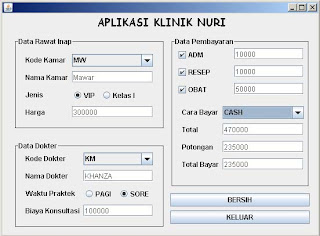
Latihan Java - Net Beans : Aplikasi Klinik NURI (sederhana).

Ketentuan Soal :

1. Kamar
---------------------------------
-Kode Kamar : BG
-Nama Kamar : Bougenville
---------------------------------
-Kode Kamar : MW
-Nama Kamar : Mawar
---------------------------------

2. Jenis Kamar
---------------------------------
-Jenis Kamar : VIP
-Harga Kamar : 300000
---------------------------------
-Jenis Kamar : Kelas I
-Harga Kamar : 200000
---------------------------------

3. Kode Dokter
---------------------------------
-Kode Dokter : KM
-Nama Dokter : Khanza
---------------------------------
-Kode Dokter : SA
-Nama Dokter : Syahniah
---------------------------------

4. Waktu Praktek
---------------------------------
-Waktu Praktek : PAGI
-Biaya Konsultasi : 50000
---------------------------------
-Waktu Praktek : SORE
-Biaya Konsultasi : 100000
---------------------------------

5. Biaya Lainnya
---------------------------------
-Admin : 10000
-Resep : 10000
-Obat : 50000
---------------------------------

6. Cara Pembayaran
---------------------------------
-Cash : diskon 50%
-Transfer : diskon 10%
---------------------------------


Source Code :

import javax.swing.JOptionPane;
/**
*
* @author aie_sendiri
*/
public class FKLINIK_NURI extends javax.swing.JFrame {
int hrg_kamar, b_konsul, adm, resep, obat, xpot, totyar, total;
double diskon, pot;
/** Creates new form FKLINIK_NURI */
public FKLINIK_NURI() {
initComponents();
}
---------------------------------------------------------------------------------------
1. Combo Box Kode Kamar :
private void ckamarActionPerformed(java.awt.event.ActionEvent evt) {
// TODO add your handling code here:
if(ckamar.getSelectedItem().toString().equalsIgnoreCase("bg")){
tkamar.setText("Bougenville");
}
else{
tkamar.setText("Mawar");
}
}

2. Radio Button Type Kamar VIP :
private void rvipActionPerformed(java.awt.event.ActionEvent evt) {
// TODO add your handling code here:
if(rvip.isSelected()){
hrg_kamar = 300000;
thrg.setText(String.valueOf(hrg_kamar));
}
}

3. Radio Button Type Kamar Kelas I :
private void rkelasActionPerformed(java.awt.event.ActionEvent evt) {
// TODO add your handling code here:
if(rkelas.isSelected()){
hrg_kamar = 200000;
thrg.setText(String.valueOf(hrg_kamar));
}
}

4. Combo Box Kode Dokter :
private void cdokterActionPerformed(java.awt.event.ActionEvent evt) {
// TODO add your handling code here:
if(cdokter.getSelectedItem().toString().equalsIgnoreCase("km")){
tnmdok.setText("KHANZA");
}
else{
tnmdok.setText("SYAHNIAH");
}
}

5. Radio Button Waktu Praktek Pagi :
private void rpagiActionPerformed(java.awt.event.ActionEvent evt) {
// TODO add your handling code here:
if(rpagi.isSelected()){
b_konsul = 50000;
tkonsul.setText(String.valueOf(b_konsul));
}
}

6. Radio Button Waktu Praktek Sore :
private void rsoreActionPerformed(java.awt.event.ActionEvent evt) {
// TODO add your handling code here:
if(rsore.isSelected()){
b_konsul = 100000;
tkonsul.setText(String.valueOf(b_konsul));
}
}

7. Check Box ADM :
private void chkadmActionPerformed(java.awt.event.ActionEvent evt) {
// TODO add your handling code here:
if(chkadm.isSelected()){
adm = 10000;
tadm.setText(String.valueOf(adm));
}
else{
adm = 0;
tadm.setText(String.valueOf(adm));
}
}

8. Check Box Resep :
private void chkresepActionPerformed(java.awt.event.ActionEvent evt) {
// TODO add your handling code here:
if(chkresep.isSelected()){
resep = 10000;
tresep.setText(String.valueOf(resep));
}
else{
resep = 0;
tresep.setText(String.valueOf(resep));
}
}

9. Check Box Obat :
private void chkobatActionPerformed(java.awt.event.ActionEvent evt) {
// TODO add your handling code here:
if(chkobat.isSelected()){
obat = 50000;
tobat.setText(String.valueOf(obat));
}
else{
obat = 0;
tobat.setText(String.valueOf(obat));
}
}

10. Combo Box Cara Bayar :
private void cbayarActionPerformed(java.awt.event.ActionEvent evt) {
// TODO add your handling code here:
if(cbayar.getSelectedItem().toString().equalsIgnoreCase("cash")){
diskon = 0.5;
total = hrg_kamar + b_konsul + adm + resep + obat;
pot = total * diskon;
xpot = (int)pot;
totyar = total - xpot;
ttotal.setText(String.valueOf(total));
tpot.setText(String.valueOf(xpot));
ttotyar.setText(String.valueOf(totyar));
}
else{
diskon = 0.1;
total = hrg_kamar + b_konsul + adm + resep + obat;
pot = total * diskon;
xpot = (int)pot;
totyar = total - xpot;
ttotal.setText(String.valueOf(total));
tpot.setText(String.valueOf(xpot));
ttotyar.setText(String.valueOf(totyar));
}
}

11. Button Bersih :
private void btnbersihActionPerformed(java.awt.event.ActionEvent evt) {
// TODO add your handling code here:
hrg_kamar = 0;
b_konsul = 0;
adm = 0;
resep = 0;
obat = 0;
xpot = 0;
totyar = 0;
total = 0;
diskon = 0;
pot = 0;
ckamar.setSelectedIndex(0);
cdokter.setSelectedIndex(0);
cbayar.setSelectedIndex(0);
btngrpkamar.clearSelection();
btngrpdokter.clearSelection();
tkamar.setText("");
thrg.setText("0");
tnmdok.setText("");
tkonsul.setText("0");
chkadm.setSelected(false);
chkresep.setSelected(false);
chkobat.setSelected(false);
tadm.setText("0");
tresep.setText("0");
tobat.setText("0");
ttotal.setText("0");
tpot.setText("0");
ttotyar.setText("0");
}

12. Button Keluar :
private void btnkeluarActionPerformed(java.awt.event.ActionEvent evt) {
// TODO add your handling code here:
int answer = JOptionPane.showConfirmDialog(null,"Ingin Keluar?","Pertanyaan",JOptionPane.YES_NO_OPTION);
if(answer == JOptionPane.YES_OPTION){
System.exit(0);
}
else{
return;
}
}


Semoga Bermanfaat !!

Wednesday, June 2, 2010

Latihan Java - Net Beans : Combo Box, Check Box, dan Radio button


Ketentuan Soal :

A. Lokasi dan Harga

1. Blok A = Rp.2,000,000

2. Blok B = Rp.3,000,000

3. Blok C = Rp.4,000,000


B. Fasilitas dan Biaya

1. Jogging Track = Rp. 100,000

2. Swimming Pool = Rp. 200,000

3. Gymnasium = Rp. 300,000


C. Cara Pembayaran

1. Bank Mandiri = Rp. 10,000

2. Other Bank = Rp. 50,000


Source Code :

import javax.swing.JOptionPane;

public class FAPPRUMAH.....bla,... bla,.. bla,...

int hrgdasar, jog, swim, gym, bayar, total;

-------------------------------------------------------------------------------------------

  1. Combo Box :

if(combo.getSelectedItem().equals("Blok A")){

vhrg = 2000000;

vtotal = vhrg + vjog + vswim + vgym + vbayar;

jhrg.setText(String.valueOf(vhrg));

jtotal.setText(String.valueOf(vtotal));

}

else if(combo.getSelectedItem().equals("Blok B")){

vhrg = 3000000;

vtotal = vhrg + vjog + vswim + vgym + vbayar;

jhrg.setText(String.valueOf(vhrg));

jtotal.setText(String.valueOf(vtotal));

}

else if(combo.getSelectedItem().equals("Blok C")){

vhrg = 4000000;

vtotal = vhrg + vjog + vswim + vgym + vbayar;

jhrg.setText(String.valueOf(vhrg));

jtotal.setText(String.valueOf(vtotal));

}

else{

vhrg = 0;

vtotal = vhrg + vjog + vswim + vgym + vbayar;

jhrg.setText(String.valueOf(vhrg));

jtotal.setText(String.valueOf(vtotal));

}

}

  1. Check Box Jogging :

if(check1.isSelected()){

vjog = 100000;

vtotal = vhrg + vjog + vswim + vgym + vbayar;

jog.setText(String.valueOf(vjog));

jtotal.setText(String.valueOf(vtotal));

}

else{

vjog = 0;

vtotal = vhrg + vjog + vswim + vgym + vbayar;

jog.setText(String.valueOf(vjog));

jtotal.setText(String.valueOf(vtotal));

}

  1. Check Box Swimming Pool :

if(check2.isSelected()){

vjog = 200000;

vtotal = vhrg + vjog + vswim + vgym + vbayar;

swim.setText(String.valueOf(vjog));

jtotal.setText(String.valueOf(vtotal));

}

else{

vjog = 0;

vtotal = vhrg + vjog + vswim + vgym + vbayar;

swim.setText(String.valueOf(vjog));

jtotal.setText(String.valueOf(vtotal));

}

  1. Check Box Gymnasium :

if(check3.isSelected()){

vjog = 300000;

vtotal = vhrg + vjog + vswim + vgym + vbayar;

gym.setText(String.valueOf(vjog));

jtotal.setText(String.valueOf(vtotal));

}

else{

vjog = 0;

vtotal = vhrg + vjog + vswim + vgym + vbayar;

gym.setText(String.valueOf(vjog));

jtotal.setText(String.valueOf(vtotal));

}

  1. Radio Button Bank Mandiri :

if(btnmandiri.isSelected()){

vbayar = 10000;

vtotal = vhrg + vjog + vswim + vgym + vbayar;

bayar.setText(String.valueOf(bayar));

jtotal.setText(String.valueOf(vtotal));

}

  1. Radio Button Other Bank :

if(btnmandiri.isSelected()){

vbayar = 50000;

vtotal = vhrg + vjog + vswim + vgym + vbayar;

bayar.setText(String.valueOf(bayar));

jtotal.setText(String.valueOf(vtotal));

}

  1. Button Bersih :

vtotal = 0;

vjog = 0;

vswim = 0;

vgym = 0;

vbayar = 0;

combo.setSelectedItem("-- Pilih --");

jhrg.setText("0");

jog.setText("0");

swim.setText("0");

gym.setText("0");

bayar.setText("0");

jtotal.setText("0");

check1.setSelected(false);

check2..setSelected(false);

check3.setSelected(false);

btngrp.clearSelection();

  1. Button Keluar :

int x=JOptionPane.showConfirmDialog(null,"Yakin Ingin Keluar??","PERTANYAAN",JOptionPane.YES_NO_OPTION);

if(x==JOptionPane.YES_OPTION){

dispose();

}

else{

return;

}